
Bhai Dooj Photo Prompts (2026): 8 Brother-Sister Moments for Gemini, ChatGPT and Grok

Bhai Dooj is about the small rituals: the tilak, the aarti, the sweet you feed your brother and the gift he pretends he forgot. These eight prompts turn a photo of you and your sibling into portraits of those moments.
Upload one clear photo with both of you. Every prompt keeps both faces unchanged and builds the festive scene around you. The app on each card made the sample image, but all eight work in Gemini, ChatGPT and Grok.
How to use these prompts
- Tap Copy prompt under the look you like.
- Open Gemini, ChatGPT or Grok and upload a clear photo of you and your sibling.
- Paste the prompt and send it.
- Want a change? Reply with one small edit at a time, like “make the outfit deep maroon”.
8 Bhai Dooj photo prompts
Video tutorial: how to use these prompts
1. Tilak Ceremony

Use the uploaded photo of my brother and me and keep both faces exactly the same. Create a warm Bhai Dooj photo of the sister applying a red tilak on her seated brother’s forehead with her ring finger, holding a decorated brass thali with a lit diya, rice, roli and sweets in her other hand. She wears a pink silk saree; he wears a cream kurta with a small handkerchief on his head as tradition. Both smiling softly. Living room with marigold torans and diyas, warm light, vertical 4:5, photorealistic.
Tip: Change “red tilak” to “red and yellow tilak with rice grains” for a more traditional look.
2. The Gift Surprise

Keep both faces from the uploaded photo unchanged. Show the brother handing his sister a wrapped gift box with a gold ribbon while she covers her mouth in happy surprise. He wears a navy kurta, she wears a mustard yellow suit with a dupatta. Background: a festive room with fairy lights, flowers and a small pooja thali on a table, softly blurred. Candid, joyful expressions, warm light, vertical 4:5, realistic.
Tip: Swap the gift for an envelope if that’s your family tradition.
3. Aarti for My Brother

Keep our faces from the uploaded photo exactly as they are. Create a close-up of the sister doing aarti for her brother, circling a brass lamp with a bright flame in front of him, while he sits with folded hands and a fresh tilak on his forehead. She wears a red and gold saree; he wears a white kurta. Warm flame light on both faces, softly blurred home temple behind them, calm and loving expressions, vertical 4:5, highly detailed and realistic.
Tip: Add “incense smoke in the background” for extra mood.
4. Sweet Feeding Laugh
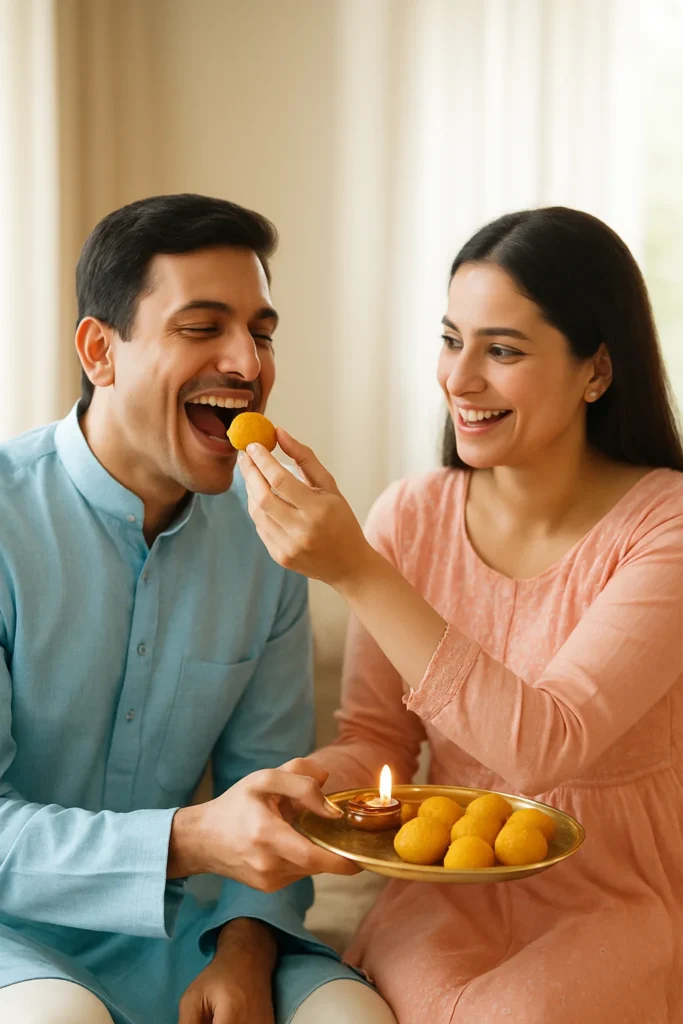
Keep both faces from the uploaded photo the same. Create a candid Bhai Dooj moment of the sister feeding her brother a ladoo while he laughs and pretends to take a huge bite. She wears a peach anarkali, he wears a light blue kurta. A thali with sweets and a diya sits between them. Bright, natural indoor light, cheerful mood, sharp faces, vertical 4:5, realistic.
Tip: Works great as a funny Instagram post with a caption.
5. Matching Ethnic Outfits Portrait

Use the uploaded photo and keep both faces, heights and hairstyles unchanged. Create a festive brother-sister portrait in coordinated outfits: she wears an emerald green lehenga with gold work, he wears an emerald green kurta with a gold Nehru jacket. They stand side by side, his arm around her shoulder, in front of a wall of marigold garlands and fairy lights. Even, flattering light, both smiling at the camera, 50mm lens, vertical 4:5, photorealistic.
Tip: Try “royal blue and silver” for a cooler colour pair.
6. Siblings on the Swing
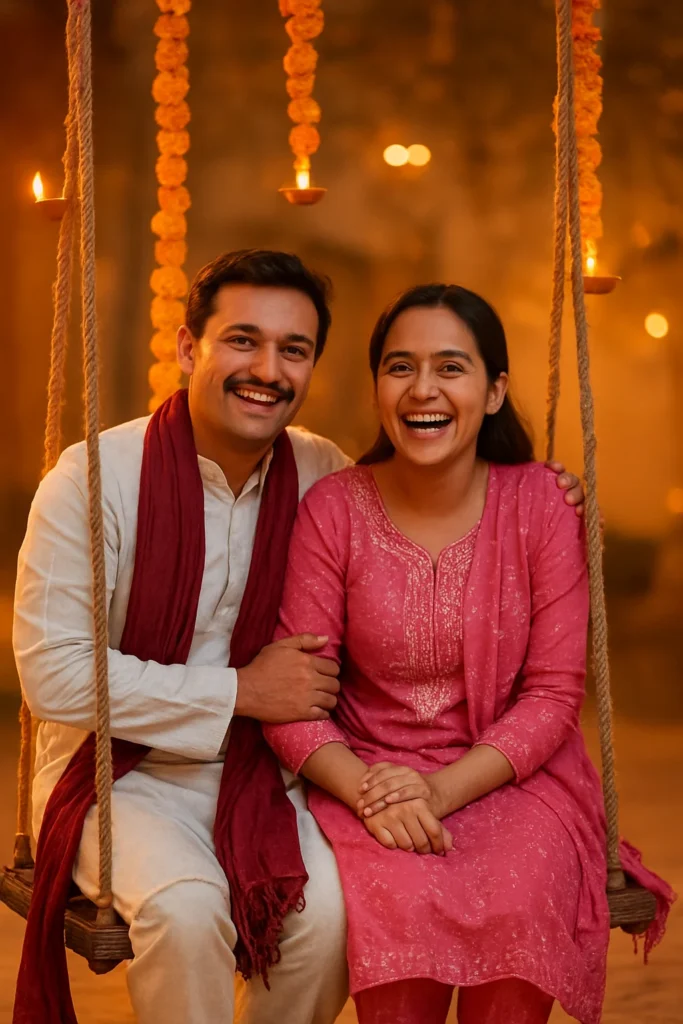
Keep our faces from the uploaded photo exactly the same. Show the brother and sister sitting together on a wooden jhoola swing in a courtyard decorated with marigolds and hanging diyas on Bhai Dooj evening, laughing as the swing moves. She wears a pink chikankari suit, he wears a white kurta with a maroon stole. Warm golden light, soft background bokeh, slight motion blur on the swing ropes only, vertical 4:5, realistic.
Tip: Ask for “still, no motion blur” if you want everything sharp.
7. Diya Selfie Together

Keep both faces from the uploaded photo unchanged. Create a selfie-style photo of the sister and brother cheek to cheek, she holding the phone at arm’s length and he holding a lit diya between them. Both smiling widely. Fairy lights and a decorated wall behind them, warm bokeh. She wears small jhumkas and a dupatta, he wears a dark green kurta. Slight phone-camera wide angle, vertical 9:16, realistic.
Tip: For a group of siblings, add “and their younger sister” and upload a photo with everyone.
8. Courtyard Portrait with Thali

Use the uploaded photo and keep both faces the same. Create a traditional Bhai Dooj portrait in a sunlit courtyard: the sister stands holding a decorated thali with a diya, roli, rice and sweets, and the brother stands beside her with a tilak on his forehead and his hands folded. She wears a yellow silk saree with a red border, he wears an off-white kurta with a saffron stole. Soft late-afternoon light, rangoli on the floor, vertical 3:4, photorealistic.
Tip: Make it an evening scene by adding “after sunset, diyas lit”.
Outfit and colour ideas for Bhai Dooj photos
Sibling photos look best when the two outfits feel like a pair without being identical.
Coordinated colours
Pick one shared colour, such as mustard, maroon or pastel pink, and let each sibling wear a different shade of it.
Traditional details
A silk saree or suit for the sister and a kurta with a Nehru jacket for the brother keep the festive look, with a brass thali and diya as the main prop.
Gifts and sweets
Adding a wrapped gift, a box of kaju katli or a coconut makes candid moments feel natural.
Tips for better results
- Use a photo where you and your sibling are side by side and both faces are sharp.
- Say who does what (“the sister applies the tilak”) so the app doesn’t swap roles.
- Keep each outfit to one main colour for cleaner results.
- If a face changes, reply “keep both faces exactly as in the uploaded photo”.
Frequently asked questions
When is Bhai Dooj in 2026?
Bhai Dooj falls two days after Diwali. In 2026 most calendars list it on 10 or 11 November, depending on the tithi in your city.
Can I use these prompts with my brother’s photo from a different picture?
If your app accepts two photos, upload both and say which photo is the sister and which is the brother. One photo of you together gives more reliable results.
Do these prompts work for cousins or friends?
Yes. Just change “brother” and “sister” in the prompt to suit the people in your photo.
